
You’ll need the following elements to create and launch a Universal Campaign.
For your influencers
📷 Logos or headshots: 1 per speaker or exhibitor; PNG | JPG; < 1MB; Background removed (optional)
📷 Influencer data: CSV file; one row per individual influencer; email address, first/last name
For speakers (optional, for inclusion on visuals): Job Title, Company Name, Session Title, custom fields
For exhibitors (optional, for inclusion on visuals): Booth Location, custom fields
⚙ Influencer visuals: bulk-create using Canva
For your campaign
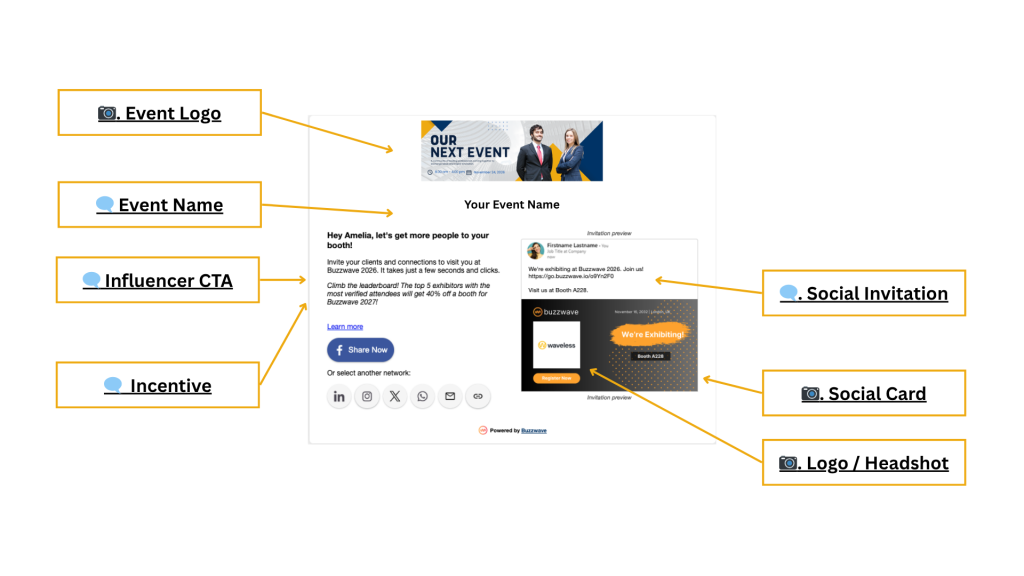
📷 Event Logo: Square or landscape; 500px minimum; PNG | JPG; < 1MB
🗨️ Event Name; < 50 char; Used for all campaigns for an event
📷 Social Card: single image; PNG | JPG
Recommended image sizes:
- Landscape: 1200 x 628px; works on all channels
- Square: 1080 x 1080px; Facebook and X will crop top and bottom of image
- Portrait: 1350 x 1080px; Facebook and X will crop top and bottom of image
🗨️ Social Invitation; Highlight benefits, encourage clicks
Character count limits:
- < 3000 chars (excl. Twitter)
- < 280 chars (Twitter)
🗨️ Influencer CTA: Short, sweet, and to the point; copy should encourage action
🗨️ Incentive: Optional but highly recommended; Use as extra motivation to encourage sharing
Not sure what works? Get some ideas here!
Creating your custom influencer visuals
Don’t settle for the same templates used by your competitors. Creating unique, scroll-stopping social cards for every speaker or exhibitor is easy if you follow our bulk-create guide.
Custom social cards no longer require a designer or hours of manual work. Using Canva Bulk Create (or Bulk Create and Generate in Adobe Express), anyone can turn a spreadsheet and some images into dozens or hundreds of custom social cards in minutes.
Still need help? Book a 15-minute session.